


iHeartRadio for Google TV
3.651.00 Reviews
App Specs
- Version
- 4.12.0
- Updated On
- License
- Free
- Downloads
- 1,000,000+
- Developer
- iHeartMedia, Inc.
- Categories
- Music & Audio
- Platform
- Android
Screenshots
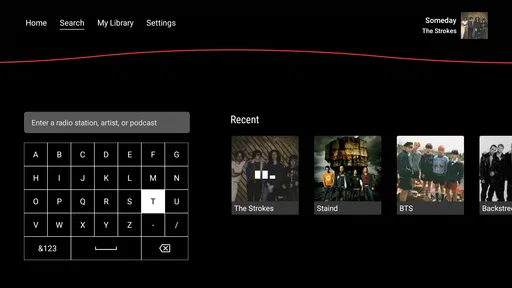
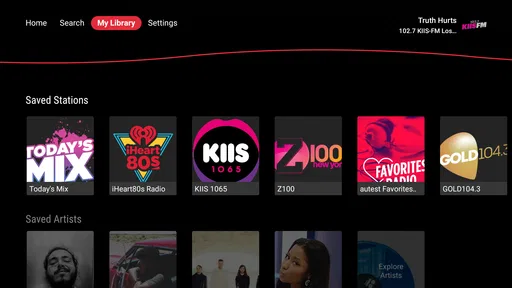
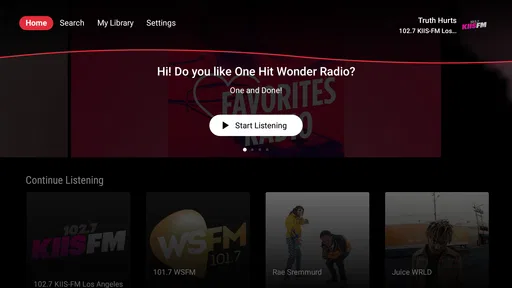


 Analysis by AppCompare
When I first opened iHeartRadio on Google TV, the appeal was easy to understand: it puts live music and podcasts in the same living-room space, without asking me to buy the app before trying it. That makes it a natural companion for a television, especially when I want background audio rather than another video to watch. I can imagine using it while cooking, tidying the room, working out at home, or letting music fill the room during a quiet evening.
That first impression matters, but it is not enough for a television app. A service can feel exciting for a few evenings and then disappear from the home screen. My main question was whether iHeartRadio could become a dependable household habit after the novelty faded. The answer is reasonably positive, although it depends heavily on what you expect from a TV-based music experience and how much variety you need from one service.
How iHeartRadio settles into everyday TV listening
I find the TV version most useful when I decide what kind of listening the room needs before I start browsing: familiar music for company, or a podcast when everyone can give it some attention. That small choice can make the app easier to share and reduce time spent navigating with a remote. Next, I’d look at how the interface and listening format feel for people with different visual, motor, and sensory needs.
The first week feels simple and inviting
The strongest part of the experience is the low effort involved in starting something to listen to. On Google TV, the large-screen setting suits the app’s basic purpose: choose a station or podcast, sit back, and let the audio continue while your attention moves elsewhere. I do not need to treat the television like a phone or keep checking a small display. That makes the app particularly comfortable for shared spaces where several people may want sound in the background.
Its Music & Audio identity is clear. This is not an app I would install for elaborate video interaction or a complicated media library. I use it when I want a radio-style flow, live music, or spoken content that can accompany another activity. The fact that it is free removes much of the hesitation involved in testing it. The developer, iHeartMedia, Inc., has built the product around a familiar listening habit rather than asking every user to construct a perfect personal collection from the beginning.
During a first week, I would recommend trying it in several different situations instead of judging it after one listening session. A station that feels right in the afternoon may not suit a late evening, while a podcast can work well when I want more focused listening. This simple experiment reveals an important strength: the app can serve different moods without requiring a separate television application for each one.
A realistic example is a Saturday morning at home. I might start a music station while preparing breakfast, switch to a podcast while cleaning, and return to music when friends arrive. The television remains useful without becoming the center of attention. That is where the app feels more practical than a service designed mainly for browsing album artwork or watching music videos.
Worth Reading Before You Choose

EA SPORTS FC Mobile 26 Is a Bigger Football Game, but It Takes Time

Flipboard Shows What News Apps Must Do Beyond the Feed

Switching to Android Auto Means Rethinking Your Driving Routine

Google Calendar Makes a Crowded Week Easier to Manage

Ludo King Makes the Most of the Minutes Between Plans

Baby Panda World Brings Quick Play to Modern Phones, but Its Game Library Feels Busy
What makes the living-room format useful
Listening through Google TV changes the role of the app. On a phone, iHeartRadio is easy to carry around, but the sound is often personal and the screen is small. On a television, it becomes a shared-room tool. I can leave it playing while people talk, and nobody has to pass a phone around just to keep the audio going. For casual gatherings, that is a meaningful advantage.
There is also less pressure to make a perfect choice. With an on-demand music library, I can spend too long deciding what to play next. A live station or podcast gives the session a direction immediately. That trade-off will appeal to listeners who enjoy discovery and dislike constant queue management. It will frustrate anyone who wants exact control over every song, album, or transition.
The app’s age rating is Everyone, which fits its broad household positioning. I would still treat the individual station and podcast choices as the important part of family use, because an all-ages label does not mean every piece of spoken content will match every listener’s taste. For a shared television, I prefer to choose the starting content myself rather than assume that an automatic recommendation will suit children, guests, or a quiet family evening.
One useful habit is to decide whether I am using the app for active listening or ambient sound before opening it. For active listening, I give myself time to explore a podcast or station. For background use, I choose something familiar and avoid repeatedly interrupting the room to browse. This small distinction makes the experience feel calmer and helps the app earn a regular place in my routine.
Where it compares well with familiar alternatives
Compared with a conventional music streaming service, iHeartRadio feels less like a personal collection and more like a set of ready-made listening channels. That is its clearest identity. If I already know exactly which tracks I want, an on-demand service is usually the better tool. If I want a radio-like stream or a podcast without building a queue, iHeartRadio is more immediate.
Compared with a basic broadcast radio experience, the app is more flexible because it brings live music and podcasts into one interface on the TV. I do not need a separate physical radio for the room, and the television offers a familiar way to access the content. The compromise is that the experience depends on navigating an app rather than turning a dial and accepting whatever is currently available.
It also differs from a podcast-only application. iHeartRadio makes sense for someone who moves between spoken shows and music rather than keeping those activities completely separate. That combination is useful on a television, where I may want one dependable audio destination during the day. A specialist podcast app may still be preferable for listeners who organize large subscriptions, track detailed listening progress, or want advanced podcast management.
The value after the first month
After the initial curiosity disappears, the app has to answer a more practical question: do I return to it without being reminded? In my view, the answer is yes for listeners who use live audio as part of a routine. Morning preparation, household chores, casual exercise, and evening background listening are all repeatable moments. The app does not need to reinvent itself each time; it only needs to start listening quickly and provide enough variation to avoid becoming stale.
The listed average rating is 3.6 from around 334 ratings, while the app has drawn over 1 million installs. I read those figures as a sign of a useful but not universally smooth experience. There is enough interest for the app to have a real audience, yet the rating suggests that convenience alone does not remove every point of friction. I would approach it as a practical free option, not as a flawless replacement for every music and podcast service.
The current version is 4.12.0, and the app supports devices running Android 5.1 or later. That broad compatibility is helpful for households using older supported hardware, although Google TV performance can still feel different from one television or streaming device to another. I would keep the app updated when possible and restart the television if playback or navigation begins behaving inconsistently. That is ordinary maintenance, but it matters more on a TV than on a phone because the whole room notices when the audio stops.
The free price is a major reason the app can remain useful month after month. I can keep it available for occasional listening without committing to another recurring subscription. There are in-app purchases ranging from $1.00 to $9.99 per item, so I would pay attention to any purchase prompt and decide whether the free experience already meets my needs. For me, the best long-term case is using the app as a no-cost audio option rather than assuming I need to spend money to make it worthwhile.
Small workflows that improve the experience
My first practical tip is to create a short rotation of listening situations instead of repeatedly searching at random. I might reserve one familiar music station for cooking, a different style for cleaning, and podcasts for focused chores. This turns the app into a habit with clear entry points. It also reduces the fatigue that comes from opening the television and facing too many choices.
My second tip is to use the TV as the shared starting point, then avoid treating it like a phone. If I keep browsing every few minutes, the app loses its advantage as background audio. I get more value by choosing a direction, lowering the visual importance of the screen, and letting the audio run. This is especially useful when guests are present, because constant menu navigation makes the room feel as though everyone is managing the television instead of enjoying the gathering.
A third insight is that podcasts change the app’s usefulness over time. Music can become repetitive if I return to the same stations too often, but spoken programs give the app another role. I can use music for short sessions and podcasts for longer chores, which spreads the listening across different kinds of content. The trade-off is that podcasts demand more attention; they are not always suitable when people are talking or when I may miss important parts.
I would also avoid using the app as the only source of audio in the home. Keeping another familiar option available gives me an easy fallback when a station does not match my mood or a podcast session feels too demanding. This is not a criticism unique to iHeartRadio; it is a sensible way to prevent any single service from becoming repetitive. The app works best as a reliable part of a listening rotation.
Maintenance is light, but not invisible
The maintenance burden is fairly modest. I do not need to manage a large downloaded library or organize every track before listening. The main responsibilities are choosing suitable content, keeping the app usable on the Google TV device, and remembering that a free service may include reasons to explore paid options. For a household that wants quick audio, that is much easier than maintaining a carefully curated personal collection.
Still, the lack of effort can become a weakness. A service built around ready-to-play listening may give me fewer reasons to organize my own long-term library inside it. If my goal is to preserve albums, build detailed playlists, or control a personal listening archive, I would choose a different kind of music application. iHeartRadio earns its space through immediacy, not through deep collection management.
Another maintenance issue is social rather than technical. On a shared TV, people may disagree about what should play. I find it helpful to decide in advance who chooses the station or podcast, especially during gatherings. That sounds minor, but it prevents the app from becoming a source of interruptions. A simple household rule can make the difference between relaxed background listening and constant arguments over the next selection.
Because the service is free, it is also worth checking whether the listening experience still feels comfortable before considering any in-app purchase. I would not spend money merely to solve boredom with a station or to compensate for using the wrong type of app. First I would test different listening contexts, then decide whether the product genuinely supports a recurring habit.
Why the novelty may fade
The biggest source of fatigue is predictable: repeated exposure to the same listening patterns. If I use one station every day for hours, its familiar character can become limiting. The app’s radio-style convenience works best when I occasionally change genres, move between music and podcasts, or allow myself to discover something outside my usual choice.
Another possible frustration is the difference between passive and precise listening. I like being able to start a stream without much planning, but I do not always want the next selection decided for me. Listeners who are particular about sequencing, artists, albums, or uninterrupted control may feel constrained. In that situation, a conventional on-demand service is the more sensible long-term home, even if iHeartRadio remains useful for occasional radio listening.
Podcasts create a separate kind of fatigue. They are excellent when I can follow a conversation, but they are less forgiving when I am distracted. If I miss a section while answering the door or speaking with someone, the experience is not as effortless as background music. I therefore use spoken content during chores I understand well, reserving music for social situations where my attention is divided.
The television format can introduce its own friction. A TV is not always the fastest device for searching, and nobody wants to navigate menus while a room is waiting for sound. I reduce that problem by opening the app before the activity begins and deciding on a general listening direction. If I expect to browse extensively, I would rather use a phone or another device and treat the TV as the playback destination.
Finally, a free app can be easy to neglect because it does not feel like a major commitment. That is both a benefit and a weakness. I can leave it installed without worrying about a subscription, but I may also forget it exists unless it becomes attached to a specific routine. The lasting value comes from assigning it a job: morning radio, weekend cleaning, or shared podcast time. Without that job, it risks becoming another unused icon.
Who should keep it installed?
I would recommend iHeartRadio to someone who wants a straightforward living-room audio option, enjoys live music, and moves naturally between music and podcasts. It is especially suitable for people who do not want to spend every session selecting individual tracks. The free entry point makes it easy to test, and the Everyone rating supports its role as a broadly accessible household app.
I would be more cautious if your main requirement is exact control. Someone with a carefully organized music library, a strong preference for specific albums, or a need for advanced podcast organization will probably be happier with a specialized alternative. The same applies if you dislike radio-style discovery or become irritated when the content does not match your intended mood immediately.
It may also be a poor fit for a household that expects the television to remain completely visual and interactive. The app’s value is primarily in what I hear, not in giving me a rich screen-based activity. That is a strength when I want to stop looking at the TV, but a weakness if I expect the display itself to provide the main entertainment.
My long-term verdict
After the first-week appeal settles down, I think iHeartRadio earns lasting space on Google TV when it is treated as a dependable audio utility rather than a complete replacement for every music service. Its best quality is the way it supports repeatable moments: I can start live music or a podcast, let the room carry on, and return to the app without rebuilding a listening plan each time.
The limitations are equally clear. It is not the right choice for listeners who demand detailed personal control, deep library management, or a carefully engineered queue. Repetition can also become noticeable if I never vary my stations or switch between music and spoken content. Those are real trade-offs, not reasons to dismiss the app, and they explain why the average rating sits below the level I would associate with a universally polished experience.
For my own use, the free access and shared-screen convenience make it worth keeping installed. I would give it a defined role, rotate the content, and avoid paying for anything until the basic listening habit proves valuable. If you want a simple way to bring radio-style music and podcasts into the living room, this app is a sensible choice. If you want a personal music command center with maximum control, I would look elsewhere and keep iHeartRadio only as a secondary option.
My final recommendation is practical rather than enthusiastic: keep it if you regularly need easy background audio on Google TV, but judge it by whether you still open it during ordinary weeks. When it becomes part of cooking, cleaning, relaxing, or shared listening, it has genuine recurring value. When it only feels interesting during the first few days, the app has probably not found the right place in your routine.
Pros
- Live radio
- podcasts
- and music are combined in one app.
- Personalized stations make discovering familiar artists easy.
- Supports large-screen listening with a simple Google TV interface.
- Many popular U.S. radio stations are available at no extra cost.
- Useful for background listening while relaxing or doing other activities.
Cons
- Availability and content vary significantly by country.
- Some features require an iHeartRadio Plus or All Access subscription.
- Video and visual features may feel limited on a television screen.
- Advertisements can interrupt free listening sessions.
- The app is less useful if your favorite stations are outside the U.S.
FAQs for iHeartRadio for Google TV
What is iHeartRadio for Google TV?
iHeartRadio for Google TV is a streaming entertainment app designed for television screens. It provides access to live radio stations, music playlists, podcasts, artist stations, news, sports, and other audio programming through a compatible Google TV device. The large-screen interface makes it convenient to browse content with a remote, although the exact catalog and available features may vary by country.
Is iHeartRadio for Google TV free to use?
Yes, iHeartRadio generally offers a free listening option supported by advertising. Users can access many live stations, podcasts, and selected music features without paying, but playback may include commercial interruptions and certain limitations. iHeartRadio also offers paid subscription plans in some regions, which can provide benefits such as fewer advertisements, on-demand music, unlimited skips, and offline listening, depending on the plan.
Do I need an iHeartRadio account to use the app on Google TV?
You may be able to listen to some content without creating an account, especially live radio stations and publicly available programs. However, signing in is recommended because it allows the app to remember favorites, personalize recommendations, synchronize preferences, and connect any eligible subscription. Account requirements can differ according to the feature being used, your location, and whether you choose the free or paid version.
Does iHeartRadio for Google TV require an internet connection?
An internet connection is required for streaming live radio, music, podcasts, and other content through iHeartRadio on Google TV. Performance depends on the stability and speed of your home network, so weak Wi-Fi may cause buffering or lower playback quality. Offline downloads, where supported by an eligible subscription, are mainly intended for mobile devices and may not be available through the Google TV application.
Is iHeartRadio for Google TV available in every country?
No, iHeartRadio availability is not universal. The service is primarily focused on selected markets, and its stations, music catalog, podcasts, subscription plans, and application availability may change based on regional licensing agreements. Before downloading, check the Google Play Store listing on your Google TV and confirm that the service supports your country. Some content may also be restricted by location even after installation.


